
Legal work runs on documents. Case files, contracts, discovery materials, correspondence – they accumulate. Whether you’re building a timeline from scattered dates, searching for contradictions in witness statements, or extracting key clauses from multiple agreements, the process is often slow, meticulous, and time consuming.
This is where artificial intelligence (AI) can make a real difference in legal practice. Instead of a human being manually combing through every document, AI can help with the heavy lifting. Upload your case materials, ask a question like “Create a timeline of events and flag any conflicting statements,” and within minutes, the AI tool can bring to the surface patterns that might have taken hours – or days – to uncover.
Many generative AI tools, such as ChatGPT, Microsoft Copilot, and Google Gemini, draw on massive training datasets that include information from across the internet. Legal-specific platforms such as Lexis+ AI Protégé and Westlaw CoCounsel combine this technology with proprietary legal databases to suggest relevant cases, statutes, and authority.
That broad knowledge is powerful. But sometimes you don’t want the universe of information. You need AI that focuses only on your documents – the specific contracts, pleadings, discovery materials, reports, or other files in front of you. You want answers that come exclusively from what you’ve uploaded, with citations showing exactly where each piece of information came from. That’s what document-grounded AI does.
This article explores Google’s NotebookLM, a free document-grounded AI tool designed to work exclusively with the materials you upload, and discusses what it means for an AI to be document grounded, why that matters for legal work, and how to use it effectively while keeping privacy and confidentiality in mind.
What is Document-Grounded AI?
Document-grounded AI is like a research assistant who reads only a case file – not the entire law library. When you ask a question, the AI tool searches through the materials you’ve provided and bases its answer solely on that content.
 Bonnie J. Shucha, U.W. 2014, is a University of Wisconsin Law School associate dean and director of the law library. She is a member of the State Bar of Wisconsin’s Communication Committee and the Law Librarians Association of Wisconsin (LLAW).
This differs fundamentally from general-purpose AI tools like ChatGPT and Google Gemini. These systems draw from enormous training datasets containing billions of web pages, books, articles, and other sources. That breadth makes them excellent for brainstorming, learning about unfamiliar topics, and getting quick answers to general questions. But it also means they might introduce information from sources users didn’t intend, blending in facts, examples, or interpretations from outside specific case materials.
Why It Matters for Lawyers
For legal professionals, this distinction carries real practical value. Document-grounded AI offers several advantages, including the following:
Reduced hallucination risk. All AI systems can occasionally generate false information. But document-grounded AI significantly reduces – though does not eliminate – the risk of hallucination. Because it retrieves information from a user’s uploaded sources rather than generating answers from its general training, it’s far less likely to invent facts. If the information isn’t in the user’s uploaded documents, the AI will typically indicate that it doesn’t have that information rather than making something up.
No contamination from irrelevant information. When AI is analyzing case documents, users don’t want the AI bringing in examples from other jurisdictions, hypothetical scenarios, or tangentially related concepts. Document-grounded AI keeps the focus narrow. If you’re reviewing three vendor contracts to compare termination clauses, the AI examines only those three contracts – not every termination clause it has ever encountered in its training data.
Verifiable responses with direct citations. When document-grounded AI answers a user’s question, it points the user to the exact source – often the specific paragraph or section of the document that the user uploaded. Click the citation to see the original text, just as you would check a footnote in a brief. This transparency helps you assess reliability and ensures you’re building your analysis on the right foundation. It also makes it easier to explain your work to clients, opposing counsel, or the court because you can trace it back to a specific source document.
What It Is Not
Understanding document-grounded AI also means understanding its limitations. This technology is not a legal research tool for finding case law or statutes. Unlike Westlaw or Lexis, it doesn’t connect to legal databases or help identify relevant precedent. It won’t find the controlling case in a user’s jurisdiction, alert the user to recent statutory changes, or show the user how courts in other states have handled similar issues. It works exclusively within the boundaries of what the user uploads.
This isn’t a flaw – it’s by design. The whole point is to keep the AI focused on a user’s specific documents. But it does mean you need to choose the right tool for the task at hand. For brainstorming creative solutions or finding relevant case law, use general-purpose AI like ChatGPT or the legal research AI tools in Lexis or Westlaw. For analyzing the specific documents in front of you with clear citations back to your materials, use document-grounded AI.
See NotebookLM in Action
The best way to understand AI is to experiment with it in a low-stakes environment. To see NotebookLM in action, explore an example notebook with ABA Formal Opinion 512 on Generative Artificial Intelligence Tools, already uploaded at https://go.wisc.edu/483no3. This opinion, issued in July 2024, provides guidance to attorneys on the ethical use of generative AI, addressing competence requirements, confidentiality protections, disclosure obligations, and billing considerations. (ABA Formal Opinion 512)
Ask questions about these ethical obligations, see how citations link back to specific passages in the opinion, and explore the various outputs NotebookLM generates – including study guides, briefing documents, client memos, mind maps, and the audio overview podcast feature. You’ll get a sense of the interface and capabilities without needing to upload your own documents.
NotebookLM: How It Works
One document-grounded tool that has gained attention in the legal community is Google’s NotebookLM. Released in 2023 and continuously improved since then, it is free to use with a Google account and was built for working with documents rather than being a general-purpose AI tool adapted for document analysis.
Getting Started. The user begins by creating a “notebook,” which is essentially a workspace for a specific project or case. Into this notebook, you upload the materials you want the AI to analyze. NotebookLM accepts a variety of file types: PDFs, Word documents, Google Docs, text files, websites, YouTube videos, and audio files. A user can upload up to 50 sources per notebook, with each source capped at 500,000 words.
Once the documents have been uploaded, NotebookLM processes them and makes them searchable. You ask questions the same way you’d ask a colleague who had just finished reviewing the file: “What damages is the plaintiff claiming?” or “When did the defendant first learn about the defect?”
The AI responds by searching through the uploaded documents and synthesizing an answer based on what it finds. Here’s a key feature: Every response includes citations that link directly back to specific passages in your source documents. Click on a citation, and the exact text the AI relied on, highlighted in context, will appear. [See Figure 1.]
This citation feature allows the user to easily verify the AI’s work. You’re not taking the AI’s word for anything – you’re checking the source yourself, zeroing in on relevant passages. Even if the AI’s synthesis isn’t perfect (and no AI is), the citations point to the right section of the right document, saving the user the time of hunting through hundreds of pages.
Interface and Features. The 3-panel interface is straightforward. Uploaded materials appear in a “Sources” panel on the left. The “Chat” panel occupies the center of the screen, where the user can view an automatically generated summary of the user’s sources, ask questions, and receive responses. Each response includes clickable citations that link back to the source documents in the left panel. [See Figure 1.] In the “Studio” panel on the right, various outputs based on the sources are generated, including overviews, reports, study guides, mind maps, and more.
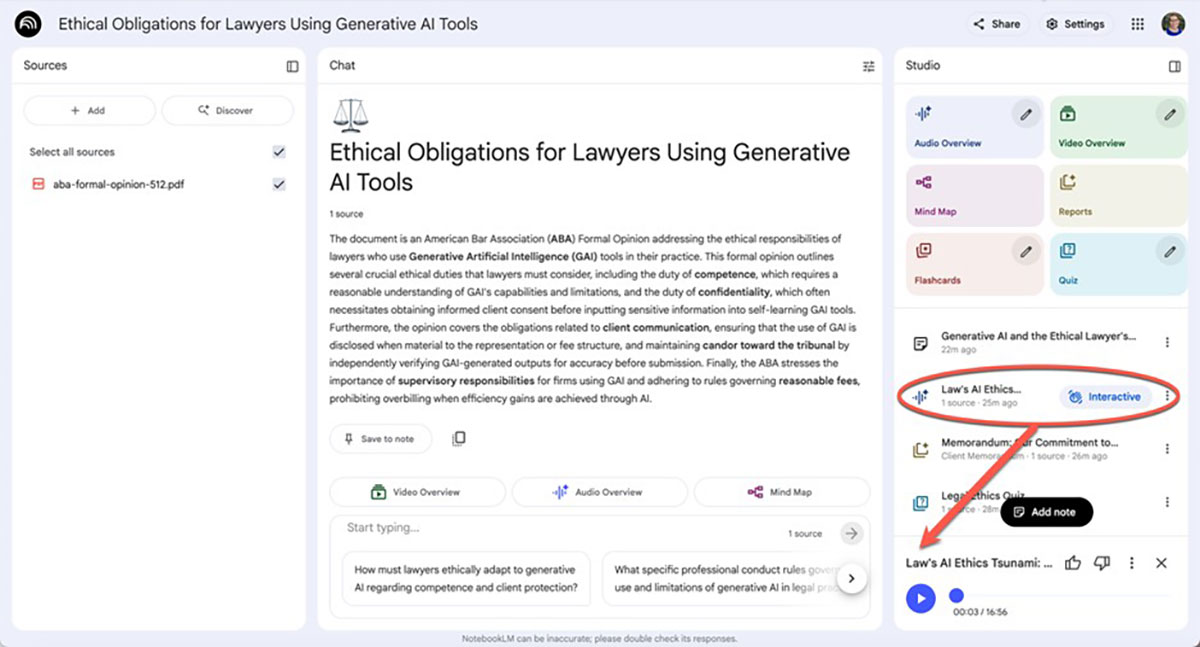
One type of output that has generated significant interest is the “Audio Overview” – essentially a podcast-style discussion between two AI voices talking about the documents. The audio typically is 10-15 minutes long and can be useful for reviewing materials when you’re on the go. [See Figure 2.] A more limited “Video Overview” feature is also available.
NotebookLM works entirely through the user’s web browser – there’s no software to install or maintain. Because it’s a Google product, users access it with a Google account at https://notebooklm.google.com/. The basic service is currently free and a “Pro” version with increased usage and additional features also is available. For more information about plans and features, see the NotebookLM Help page at https://support.google.com/notebooklm.
Notebook LM’s Interface
Figure 1: Verifiable Responses with Direct Citations. NotebookLM’s three-panel interface, showing the “Sources” panel (left) with the uploaded document, the “Chat” panel (center) with the user question and AI’s answer, and the “Studio” panel (right) with output options. The arrow highlights a clickable citation (“2”), which links directly to the source text for verification.
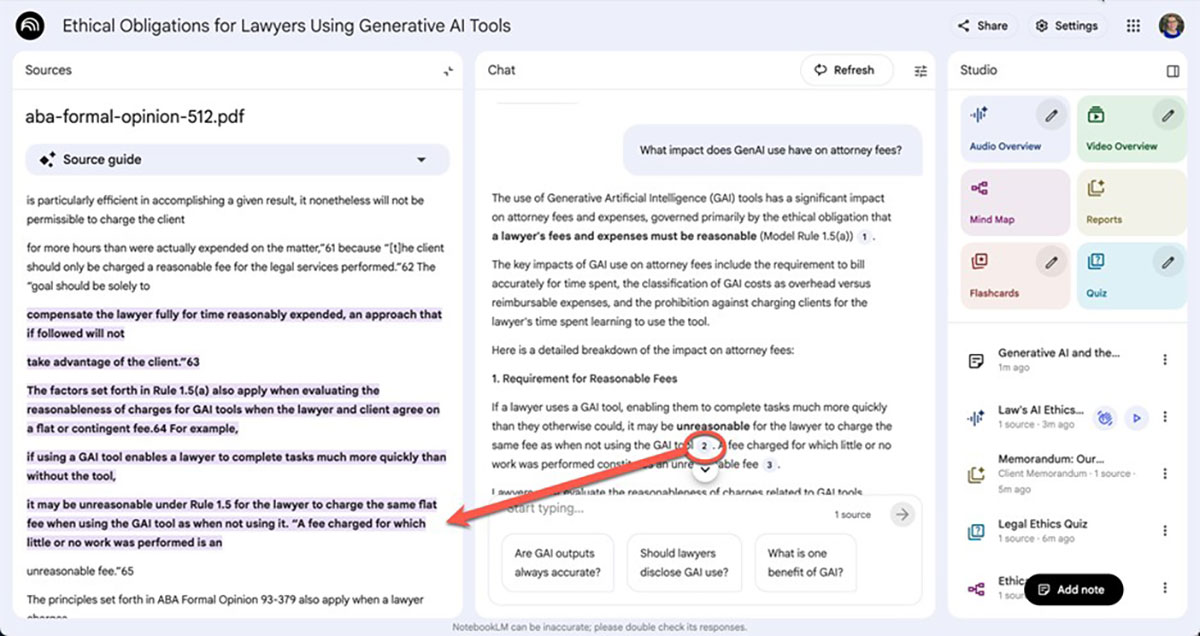
Figure 2: The Audio Overview Feature. In the “Studio” panel (right), users can select various outputs, including “Audio Overview,” which generates a podcast based on their sources (circled). The audio player (indicated by the bottom arrow) then appears, allowing the user to play it in the browser or download it for on-the-go review.
Practical Applications
NotebookLM excels at factual and organizational tasks: creating timelines, extracting and organizing information, comparing documents, spotting patterns, and generating easy-to-read summaries. It is not well suited for tasks requiring legal interpretation, subtle distinctions, or information that is implied but not stated clearly. Here are some ways to take advantage of the tasks at which NotebookLM excels:
Case file analysis. The user uploads pleadings, discovery materials, and correspondence, then asks about key factual disputes, damages calculations, or inconsistencies across documents. NotebookLM creates a timeline that pulls dates from wherever they appear – emails, depositions, pleadings – and organizes them chronologically. The user can request focused summaries of lengthy depositions or expert reports.
Document review and comparison. The user asks NotebookLM to extract and compare specific provisions across multiple agreements, such as termination clauses, indemnification language, or payment terms. NotebookLM produces side-by-side comparisons with direct citations to each contract.
Client communication. The user uploads technical reports and requests plain-language explanations. NotebookLM generates plain-language FAQs from complex materials or creates chronologies that present information in accessible language.
Staying current. The user uploads professional articles, bar association opinions, or regulatory updates relevant to the user’s practice area, then asks targeted questions. NotebookLM generates an audio overview that can be listened to at any time.
These applications demonstrate NotebookLM’s utility, but effective use requires careful attention to privacy and confidentiality.
Privacy and Confidentiality
Before using NotebookLM – or any AI tool – attorneys should first review relevant AI-use policies. Some courts and organizations prohibit certain AI tools entirely, while others specify approved platforms or require specific account types. Policies might mandate disclosure to clients, require documentation of AI use, or establish guidelines for which information can be uploaded. If your organization doesn’t have an AI policy, consider helping develop one. Don’t assume silence means permission.
Understanding how NotebookLM handles data is equally important. The privacy protections vary dramatically depending on which type of Google account is used – and account choice determines whether an attorney or other legal professional can ethically use NotebookLM for client work.
Personal Google Accounts: Not for Client Work. With a personal Google account, human reviewers at Google can examine queries, uploads, and the model’s responses for troubleshooting, addressing abuse, or making improvements. This means a human reviewer could potentially see clients’ documents and users’ questions about them.
Personal accounts work fine for public materials – published opinions, publicly available documents, bar association guidance, or scholarly articles. But for discovery materials, draft pleadings, confidential correspondence, or anything containing client information, a personal account creates an unacceptable breach-of-confidentiality risk.
Subscribing to the paid “Pro” version of NotebookLM with a personal account does not solve this confidentiality problem. The “Pro” plan only increases usage limits (such as the number of sources a user can upload); it does not provide the enterprise-grade data privacy and confidentiality protections of a Google Workspace account.
Google Workspace Accounts: Built for Professional Use. Workspace accounts provide enhanced privacy protections. Users’ uploads, queries, and responses are not reviewed by human reviewers and are not used to train AI models. This enhanced privacy framework, guaranteed under the Google Workspace terms of service, makes client work possible while maintaining required confidentiality protections.
If you’re not sure whether your firm uses Google Workspace, ask your IT department or administrator. Solo practitioners and small firms should consider whether the investment makes sense for the privacy protections Google Workspace provides.
Protecting Client Information. Even with proper privacy protections, think carefully about what you upload. Before uploading any document, ask yourself: Would disclosure harm my client? Does this contain privileged communications? Is this already public? When in doubt, don’t upload it.
Creating Sanitized or Redacted Versions. If you’re concerned about uploading sensitive information, you can create sanitized or redacted versions that preserve legal issues while removing identifying information.
Replace names with generic descriptors: “Employee” instead of “John Smith,” “Technology Company” instead of “ABC Corp.”
Remove or generalize dates when not legally relevant.
Eliminate addresses, phone numbers, and unique identifiers.
Preserve the legal issues and fact patterns that matter.
Conclusion
Document-grounded AI tools like NotebookLM are built for the document-heavy reality of legal practice. These tools help users focus on the specific materials they need to analyze and work through them more efficiently without pulling in information from across the internet.
The value lies in precision and verifiability. Every answer points back to a specific passage in a document the user has uploaded, making it easy to verify the AI’s work and ensuring that the AI tool is working only with the user’s materials. NotebookLM’s straightforward interface makes it accessible for exploring how document-grounded AI might fit into a practice. For attorneys handling piles of documents, staying focused on just your materials may be exactly what you need.
» Cite this article: 98 Wis. Law. 31-34 (December 2025).
